
Insights from Recruiters Websites
Security Alert: Fraudulent Emails Impersonating Recruiters Websites

We’ve received reports of suspicious emails impersonating our team. Here’s how to recognize these messages, protect your information, and verify communications from Recruiters Websites.
At Recruiters Websites, protecting our clients and maintaining their trust are priorities. That’s why we’re sharing an important warning about fraudulent emails being sent to recruiting firms using our company’s name and the identity of Jeff Gipson.
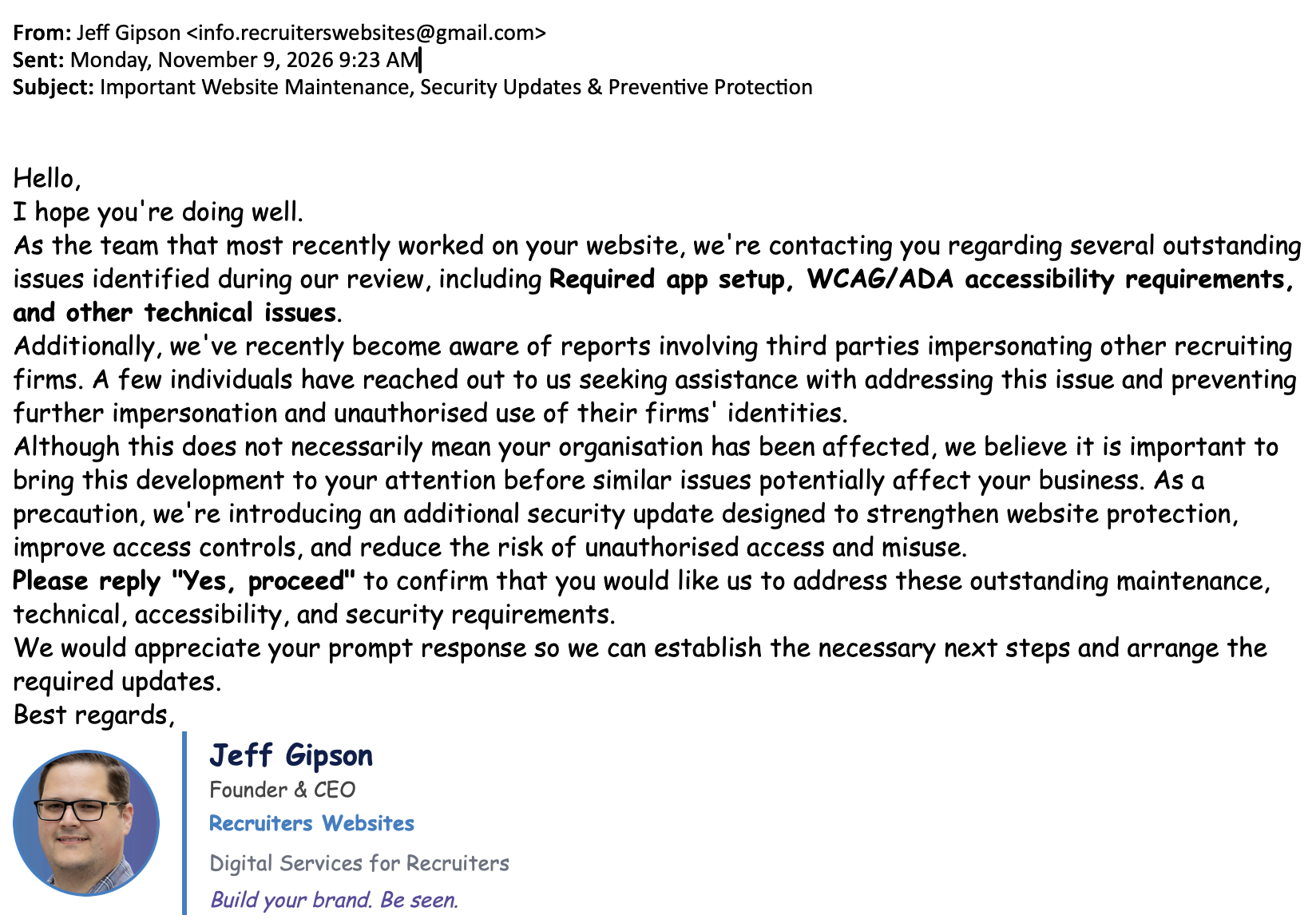
These messages claim to identify website maintenance issues, accessibility requirements, and security concerns. They then ask recipients to authorize additional work.
These emails are not from Recruiters Websites, and the requests have not been authorized by our team.
We want to make sure our clients know what to look for, what to do if they receive one of these messages and how to protect their businesses from similar attempts.
What the fraudulent emails look like
One of the emails reported to us includes the following details:
- Sender name: Jeff Gipson
- Fraudulent email address: info.recruiterswebsites@gmail.com
- Subject line: Important Website Maintenance, Security Updates & Preventive Protection
- Claims: Outstanding website maintenance, required app setup, WCAG/ADA accessibility requirements and additional security updates
- Requested action: Replying “Yes, proceed” to authorize the proposed work
The email also references reports of recruiting firms being impersonated by third parties, suggesting that additional website security measures are necessary.
This language is designed to sound legitimate. Website security, accessibility, and maintenance are real considerations for businesses, which makes these claims particularly concerning when used by someone impersonating a trusted service provider.
Please note: The email address above is not an authorized Recruiters Websites email address. The use of Jeff Gipson’s name does not mean the message originated from him.
How to recognize a suspicious email
Fraudulent emails aren’t always filled with spelling mistakes, strange links or obvious requests for money. Some are written to resemble routine business communications.
Here are several warning signs to watch for.
1. The sender’s email address doesn’t match the company
An email may display a familiar name while originating from an unrelated address.
In this case, the sender uses Jeff Gipson’s name but sends from a Gmail account rather than an official company address.
Always inspect the actual sender address, not just the name displayed in your inbox.
2. The message creates concern about an urgent problem
Scammers frequently reference security vulnerabilities, compliance requirements, expiring services, or technical problems to encourage a quick response.
These issues may sound serious, but a legitimate concern should be independently verified before you authorize work or share information.
3. You’re asked to approve work you didn’t request
The reported email asks recipients to reply “Yes, proceed.”
That may seem harmless, but responding can establish contact with the sender and lead to further requests for access, sensitive information, or payment.
If you’re unfamiliar with a proposed service or maintenance request, contact your provider using a communication method you already trust.
4. The message uses familiar names and business details
A fraudulent email may reference your website, service provider, company leadership, or common technical terminology.
Those details alone do not establish that the sender is legitimate. Much of this information can be obtained from publicly available websites and professional profiles.
What to do if you receive one of these emails
If you receive a suspicious message claiming to come from Recruiters Websites, we recommend the following steps:
- Do not reply. Avoid responding to the sender, even to ask whether the message is legitimate.
- Do not click suspicious links or open attachments. They may lead to fraudulent websites or malicious software.
- Do not provide credentials or payment information. Never share website administrator logins, hosting credentials, passwords, or financial details in response to an unverified request.
- Contact Recruiters Websites directly. Use our official website, an existing, verified contact method like support@recruiterswebsites.com, or a phone call to 573-873-1315 to confirm whether a request is legitimate.
- Report the message as phishing. Most email services offer an option to report suspicious messages. This helps their systems identify similar attempts.
- Delete the email after reporting it. There’s no need to continue communicating with the sender.
If possible, preserve the message as an attachment or forward it to your IT administrator for investigation before deleting it.
What if you’ve already responded?
First, don’t panic. The appropriate next steps depend on what information you’ve shared and whether you’ve taken additional actions.
If you only replied: Stop communicating with the sender. Be cautious of follow-up messages, especially requests for payments, passwords, or website access.
If you clicked a link or opened an attachment: Contact your IT administrator or security provider. They can help determine whether further investigation or a device security scan is necessary.
If you shared a password: Change it immediately through the legitimate service, change it anywhere else you’ve reused it, and enable multifactor authentication where available.
If you provided website access: Contact your website provider immediately so access can be reviewed and unauthorized accounts or changes can be investigated.
If you submitted payment information or sent money: Contact your financial institution promptly to discuss protective measures and possible recovery options.
You can also report suspected phishing and fraud to the Federal Trade Commission at ReportFraud.ftc.gov.
Best practices for protecting your recruiting firm
This incident is a useful reminder that cybersecurity isn’t just a concern for large corporations.
Recruiting firms manage sensitive business relationships, candidate information, and client communications. That makes it especially important to establish good security habits across your organization.
Verify unexpected requests independently
If a vendor, client, or colleague unexpectedly requests payment, login credentials, account changes, or approval for technical work, verify the request through a known phone number or established communication channel.
Do not rely on contact information supplied in the suspicious message itself.
Use multifactor authentication
Enable multifactor authentication for business email, website administration, your applicant tracking system, financial accounts and other services that support it.
An additional verification step can help protect accounts even when a password has been compromised.
Limit access to business systems
Give employees and outside vendors only the level of access they need. Review accounts periodically and remove access when it’s no longer necessary.
Keep software and accounts updated
Regularly install security updates for devices, browsers, websites and business applications. Work with your technology providers to understand which updates they manage and which require your attention.
Make suspicious-email reporting easy
Ensure everyone on your team knows whom to contact when they receive an unusual message.
Encourage employees to verify questionable requests rather than acting immediately. A quick confirmation can prevent a much larger problem.
Be especially careful with financial changes
Requests to change payment instructions, banking information or vendor account details should always be confirmed through an established contact method.
Even messages that appear to come from familiar business partners deserve additional verification when money or sensitive information is involved.
How to verify communications from Recruiters Websites
If you receive an unexpected message claiming to come from our team, especially one involving website security, accessibility, maintenance, account access or payment, we encourage you to contact us directly.
Visit recruiterswebsites.com and use our official contact information to reach our team.
We can help you determine whether a message is legitimate and whether any action is necessary.
Remember that email display names can be impersonated. A message bearing the name of someone you know is not, by itself, proof of authenticity.
We’re here to help
We appreciate the clients who brought these fraudulent messages to our attention. Their reports allow us to warn other recruiting firms before they encounter similar attempts.
At this time, the example we’ve reviewed involves an outside Gmail account impersonating Jeff. This is not, by itself, evidence that Recruiters Websites’ email systems or client websites have been compromised.
We will continue to take reports of impersonation seriously and share information when it can help protect our clients.
If something doesn’t look right, please reach out. We’d much rather confirm a legitimate message than have a client act on a fraudulent one.
Have you received a suspicious email claiming to be from Recruiters Websites? Contact our team so we can help you verify it.
Like what you're reading? Get more in your inbox.
Join thousands of recruiters who receive our industry tips, insights and inspiration every week.

Emily Blattel
Emily brings more than 15 years of professional experience in public relations, advertising and marketing to Recruiters Websites, with a special emphasis on media relations, digital and social media strategy and implementation, content creation, internal communication, creative strategy and event planning.
Insights & News